
Stand Out Customizer Guide: Appearance and Catalog
Use Customize to edit your character, Builder to create accessories and Catalog to browse or share public creations. These menus handle different parts of the appearance system.
Start in the character editor
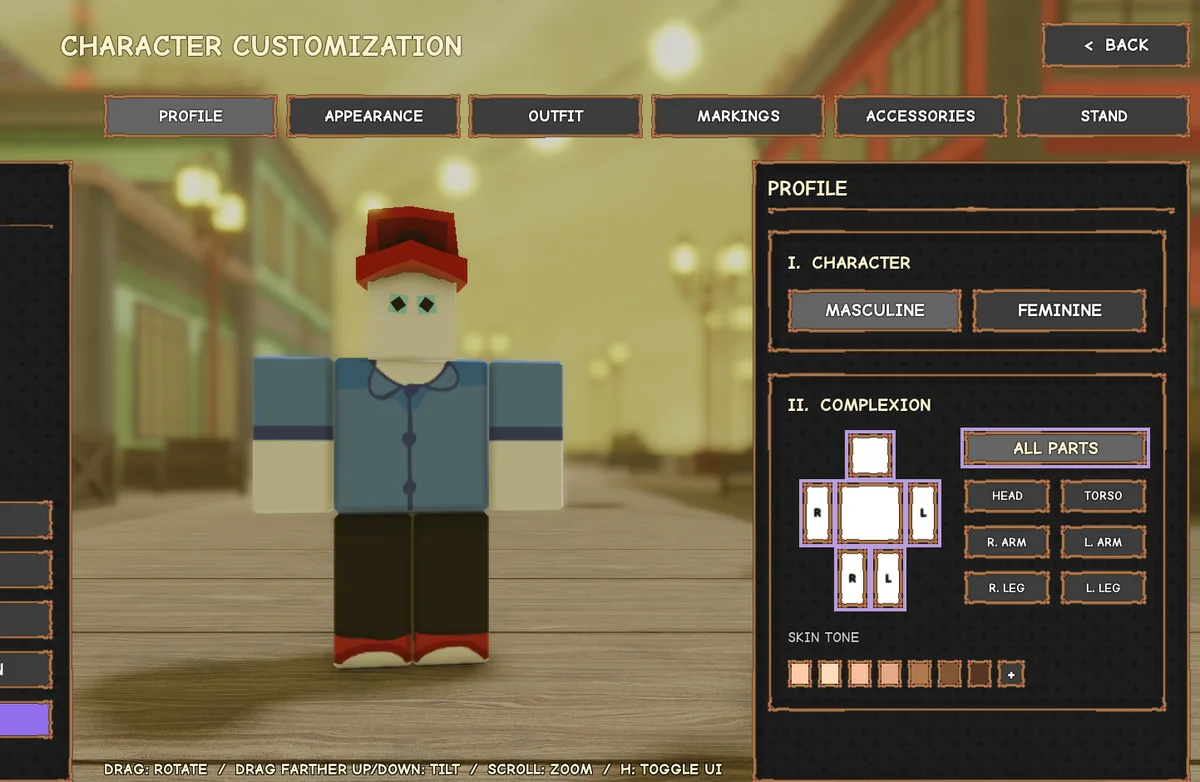
The official Customize screenshot shows Profile, Appearance, Outfit, Markings, Accessories and Stand tabs. Begin with the category that matches the change you want, then inspect the character preview.
Our recommended workflow is to change one category at a time and check the result before moving to another. This makes it easier to identify which choice caused an unwanted appearance change.
Customize, Builder and Catalog are separate
| Menu | Purpose | Before using it |
|---|---|---|
| Customize | Edit your character’s look | Choose the correct category and inspect the preview. |
| Builder | Create accessory designs | Check the current access requirement, save capacity and upload limits. |
| Catalog | Discover and share public creations | Read whether the action saves, buys or publishes an item. |
Character slots and appearance exports
The official Character Slots card gives a maximum of three slots and lists unlocking 30 Stands, completing the storyline or paying 100,000 Coins as unlock routes. Inspect the selected slot’s stats before choosing it; a slot is not simply an extra hairstyle preset.
Stand Out Wiki documents appearance export codes for restoring or sharing character visuals. Keep a copy when the editor provides one. These are not promotional reward codes and do not belong in the Phone’s Gifts application.
How Catalog supporters are counted
The Catalog card says a player becomes a supporter when they save or purchase a public item, with each item counted once for that supporter. This makes the supporter counter different from a simple sales total.
Published rank thresholds include 10 for Rough Sketch, 25 for Storyboard, 100 for Inked, 500 for Serialized, 2,000 for Bestseller, 4,000 for Masterpiece and 8,000 for Heaven’s Door. The last rank lists Builder+ and Heaven’s Door Prime. Check the current Catalog before investing effort around a reward threshold.
Builder access and patch-sensitive limits
The reference site reports paid Builder access and historical exceptions for early testers. This guide does not promise a free unlock or a fixed current Robux price; the live pass description is the place to check access before buying.
The November 16 official notes mention the Less/More UI option for PC Builder and a console building fix. If a tutorial shows a different panel layout, look for that display option before assuming the tool is missing.
Sources and review date
Reviewed November 22, 2026 against the public Stand Out Trello and the linked Stand Out Wiki reference. This is a launch-era documentation review, not in-game testing; no numbered live build was verified.