
Anime Crusaders X Codes and How to Redeem Them
Find reported Anime Crusaders X rewards, including THANKYOUFOR50K, plus help with the Codes menu and account-level requirements.
Codes and reported rewards
Sources reviewed November 21, 2026 (Asia/Shanghai): Pro Game Guides and Destructoid list these ten codes as active. ArcadeWiki has not redeemed them in-game. Rewards and availability are reported, not guaranteed; follow the response shown on your account.
| Code | Reported reward |
|---|---|
THANKYOUFOR50K | 25 Curse Tokens, 25 Relic Cubes, 50 Stat Cubes, 100 Trait Remnants and 50 Perfect Stat Cubes |
NEWACPEAKTHANKYOU | 4,600 Gems and 75 Trait Remnants |
JUSTTHESTART | 1,500 Gems and 50 Trait Remnants |
RobloxVNGBACK | 1,000 Gems and 30 Trait Remnants |
THANKYOUFOR30KMAJORFIXES | 1,000 Gems and 50 Trait Remnants |
ACBESTTD2026 | 5,000 Gems, 50 Curse Tokens, 50 Relic Cubes and 50 Stat Cubes |
SORRYFORSHUTDOWNEA2026 | 50 Trait Remnants |
WELCOMETOACX | 5,000 Gems and 200 Trait Remnants |
ACCOMEBACK | 200 Trait Remnants — requires account level 20 |
ANNIVERSARY | 100 Trait Remnants — requires account level 10 |
How to redeem Anime Crusaders X codes
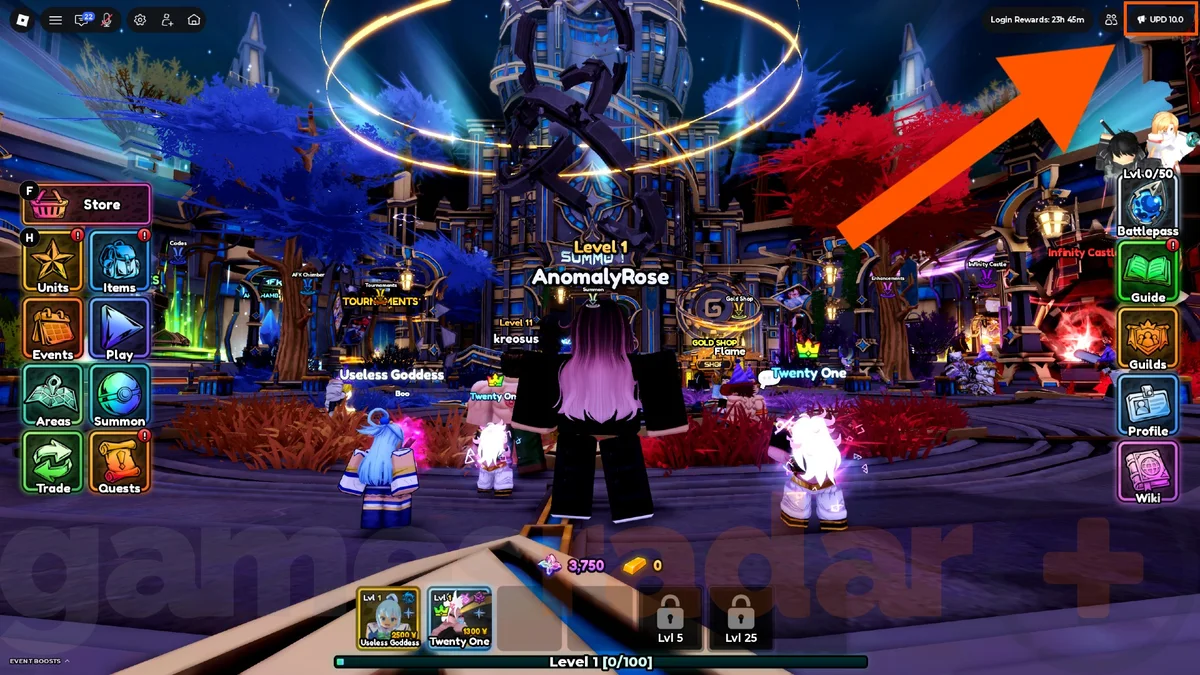
GamesRadar's X guide places code entry under Notifications. Pro Game Guides still describes a green Codes circle in the lobby, so the two published instructions differ. Try the menu route first and use the lobby marker if that is what your version displays.
- Launch the official Anime Crusaders X experience by 32x and wait for the lobby.
- Open the update/Notifications button in the upper-right corner (labelled UPD 10.0 in the reference screenshot), then choose Codes.
- Copy one code from the table into the entry field and select Redeem.
- Read the confirmation and check the matching currency or item balance before claiming another promotion.
Find the code field in the Update Log
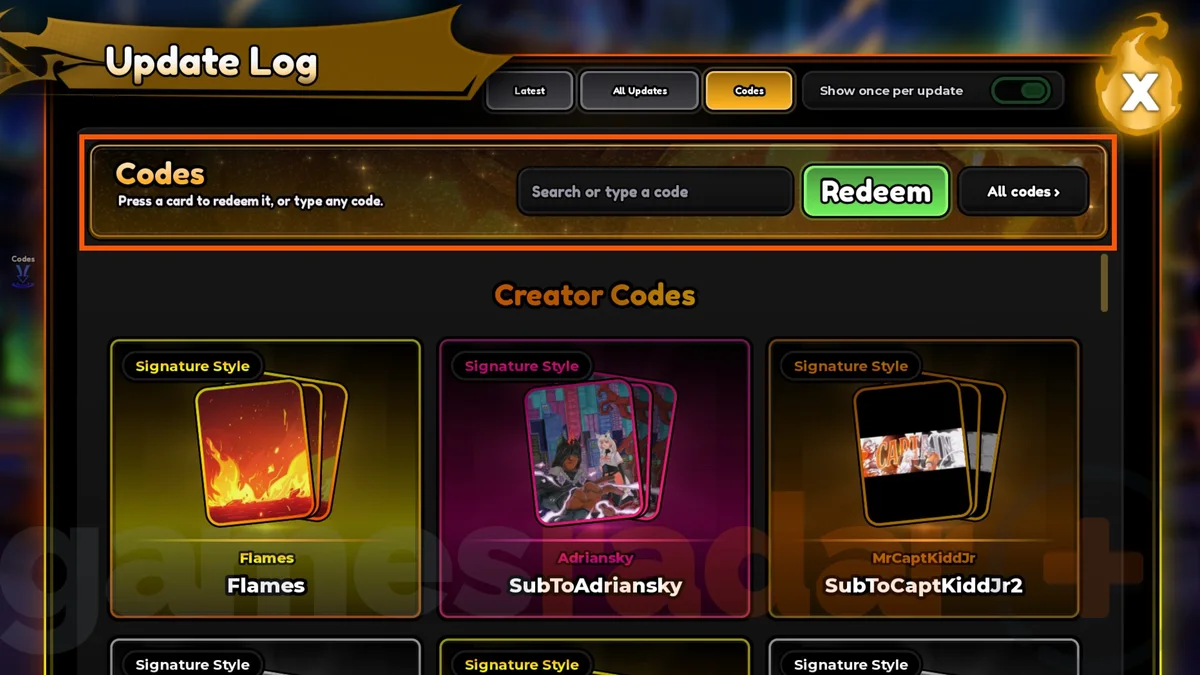
In the reference image, the Codes tab is selected at the top of the Update Log. Enter the promotion in the 'Search or type a code' field and select the green Redeem button.
The cards below the input are labelled Creator Codes and Signature Style. They are a separate part of the pictured menu; this screenshot does not confirm the availability of the resource codes listed above.
Requirements and spelling
Reach account level 10 for ANNIVERSARY and level 20 for ACCOMEBACK. A level restriction does not by itself mean the promotion has expired. Pro Game Guides also asks players to join the 32x community and favorite the experience before redemption.
Preserve the mixed case in RobloxVNGBACK and omit spaces around every code. Some lists append an eagle emoji to NEWACPEAKTHANKYOU or JUSTTHESTART; our copy buttons use the plain strings listed by Pro Game Guides and Destructoid. If rejected, compare with the live game's own promotion label.
Older codes: expired reports and disputed status
GamesRadar places TY7KAL, 32xCOMEBACK and ANIMECRUSADERSX2026 in its expired list. Other indexed lists still advertise variants such as 32xComeback and AnimeCrusadersX2026. We exclude these disputed entries from the ten reported codes above rather than treating an older listing as proof of availability.
This is a short archive of relevant conflicting reports, not a complete history of every promotion. A different capitalization is not evidence of a separate reward.
Why is a code not working?
Use the actual game response to choose the next step. These are troubleshooting suggestions, not error messages reproduced by ArcadeWiki.
| Problem | What to check |
|---|---|
| Level requirement | Check your account level against ANNIVERSARY or ACCOMEBACK before retrying. |
| Invalid or expired | Remove extra spaces, compare the exact promotion text and check current announcements. Listed codes can be retired. |
| Already redeemed | Check whether this account claimed it earlier; a repeated entry may not grant another reward. |
| Community requirement | Confirm you joined 32x using the same Roblox account and follow any requirement shown in-game. |
| Success without more Gems | Some codes award only Trait Remnants. Check the specific item or currency named in the reward. |
| Cannot find Codes | Look under Notifications first, then check the lobby for a green Codes marker if your interface differs. |
What to do with the rewards
Set a spending target before using the new balance. If your team needs a usable damage unit, inspect the summon banner; if it already clears comfortably, keep some resources for a later upgrade. Read each reroll item's description before consuming it.
Gems, Trait Remnants and cubes are game resources. None of these listed promotions advertises free Robux.
Sources and review notes
Reward amounts follow the matching Pro Game Guides and Destructoid reports. Both spell the first THANKYOUFOR50K item as 'Cruse Token'; this page uses 'Curse Tokens', consistent with their ACBESTTD2026 entry. Check the in-game item name when claiming.
The date records a source review and content update, not an in-game redemption test. Follow the developer's announcements through the official Roblox listing for subsequent changes.