
Steal A Balut Codes and How to Redeem Them
Try these codes for cash and speed, then check the in-game confirmation. Codes can expire or change without notice.
Codes and reported rewards
Listed on the official Roblox game page checked November 6, 2026. ArcadeWiki has not redeemed these on a live account; availability can change.
| Code | Reported reward |
|---|---|
RELEASED | $25,000 Cash |
BALUT | 500 Speed |
OG | 1,000 Speed and $100,000 Cash |
How to redeem codes
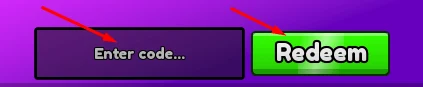
Open Steal A Balut in Roblox, select Shop, and find Codes inside the Shop window. Enter one code exactly as shown and press Redeem. Menu labels or placement may change with updates.
Read the response and check the matching resource: RELEASED lists Cash, BALUT lists Speed, and OG lists both.
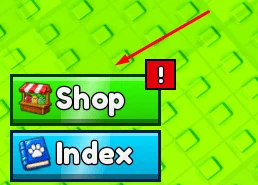
Find Codes inside Shop
Select the purple Codes control shown in this reference screenshot. The redemption section belongs to the Shop flow; it is separate from the Index collection screen.
If the layout has changed, look through the current Shop controls for the Codes label. Avoid repeatedly entering a string in a search box or another Roblox redemption page.
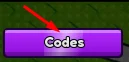
Submit one code and read the result
Paste only RELEASED, BALUT or OG into the field and select Redeem. Leave out quotation marks, the reward amount and punctuation from the surrounding explanation.
Record the message before trying again. A successful Speed reward should be checked against the Speed display; a Cash reward belongs in the Cash balance. The word EVENTS in the public description is a heading, not a fourth code.
Why is my code not working?
Start with the message your game displays. The scenarios below are a troubleshooting checklist, not a list of error messages independently reproduced by ArcadeWiki.
| What happened | What to check | What to do next |
|---|---|---|
| You cannot find the input | Shop, then Codes | Follow the screenshots above; Index is a different screen. |
| The entry is rejected | Exact spelling, spaces and punctuation | Copy only the code and compare it with the official listing. |
| The response refers to a previous claim | Whether this account already used it | Do not expect repeated claims to grant the reward again. |
| Success, but Cash is unchanged | Which resource the code awards | BALUT lists Speed; check the Speed display. |
| One code fails while another works | The response for that specific entry | Do not assume every listed code shares the same expiry or account status. |
Where to check for updates
Check the Roblox game description and the developer's linked community channels for announcements. A listing does not guarantee a code still works in your session.
The invitation to like the game and join its community is separate from code entry. Redeem inside Roblox; never share your password or browser cookies to claim a reward.
Are these free Robux codes?
No. The official listing names in-game Cash and Speed rewards. It does not list Robux rewards for these strings. Cash in this experience should not be confused with the Robux currency used for paid Roblox purchases.
If a third-party list spells a code differently, use the exact string in the official description and inspect the game response. The three entries above are listings checked on the stated date, not a promise that every account can redeem them.
What to do after claiming rewards
The three advertised rewards add up to 125,000 Cash and 1,500 Speed if all three are available to your account and grant the listed amounts. This is the sum of the listing, not a tested payout promise.
Use the extra Cash for a purchase you already understand. If your first return is unfinished, learn placement before spending across several systems. If you already have earners, compare your active pets and current slot or tool offer first.