
Akayuki Beginner Guide: Controls and Forge Blades
Learn the controls first, fight in the beginner arena, level toward each blade upgrade and check the Forge. This guide separates what the official Roblox page says from what a published guide reports and what ArcadeWiki has not tested.

Your first session in order
- Join AKAYUKI: Steel Blossoms Red from the official Roblox page linked at the bottom of this guide.
- Open the controls menu and read the basic attacks, movement abilities and sword actions before you fight. A published guide recommends learning the controls first.
- Fight in the beginner-friendly arena to learn the combat system. Defeating enemies and other players earns EXP.
- Level up toward each upgrade: the official description says a new blade upgrade arrives every 5 levels, with the maximum upgrade at level 50. Visit the Forge when one unlocks.
- Roll your family name in the character menu. Rarer names give better stat uplifts, according to the official description.
- Open the Codes option on the main menu to redeem rewards. See the codes guide for the reported list.
Reported controls and sword actions
The Roblox page does not publish a controls table. The actions below come from a third-party guide published in November 2026; ArcadeWiki has not tested them, and the guide gives a key only for Kick. Check the in-game controls menu for the current bindings.
| Action | What the guide reports |
|---|---|
| Kick | Activated with the F key during combat. |
| Side Dash | A movement ability used to move around an opponent and find a better attack angle. |
| Downward Cut | A sword attack the guide uses after a dash. |
| Lock On, Draw, Sheath, Wipe Sword | Named as sword actions in the controls menu. No keys are given. |
Beginner arena and main arena
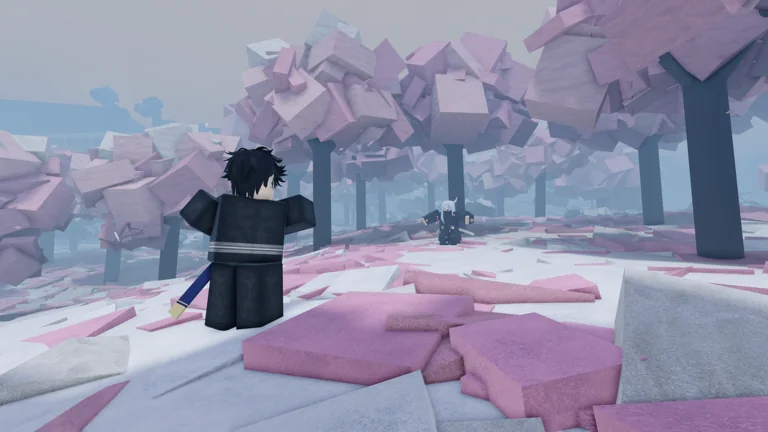
The same guide says new players start in a beginner-friendly arena where you can practice controls and combos, then move on to a main arena with more experienced players and harder fights. It does not name the arenas or say what triggers the move, and ArcadeWiki has not confirmed the exact requirement.
A sensible approach is to stay in the beginner arena until your dashes and attacks feel reliable. The guide also suggests raising mouse sensitivity slightly so you can track opponents more quickly.
Reported PvP combos
The published guide lists two simple combinations: Dash, then Kick, then regular sword attacks; and Dash, then Downward Cut. Its general advice is not to attack from the front every time, to change position with Side Dash, to avoid repeating the same combo against experienced players and to watch your opponent's movement.
These are reported tips rather than tested results, and the guide does not explain blocking, parrying or poise. Treat them as a starting point and adjust to how opponents actually behave.

Forge blades: Sakura (Forge Rank 8)
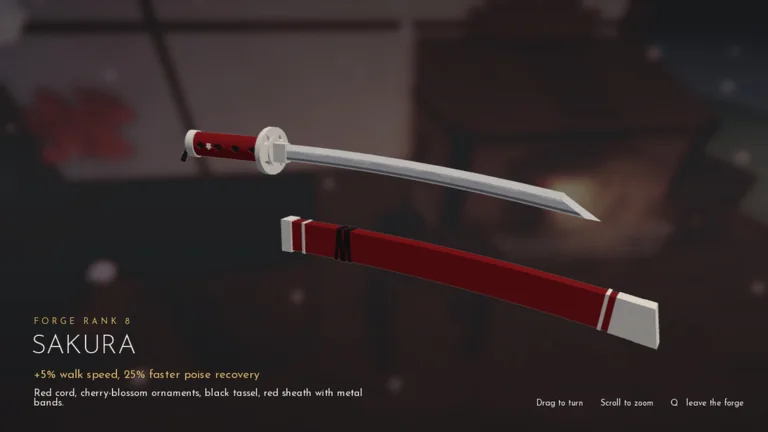
The official Forge screenshot for Sakura lists a Forge Rank of 8 and two passive effects: +5% walk speed and 25% faster poise recovery. Its description reads: red cord, cherry-blossom ornaments, black tassel and a red sheath with metal bands.
A published guide also says stronger katanas bring passive effects and better walking speed, which matches this listing. In the viewer you can drag to turn the blade, scroll to zoom and press Q to leave the forge.
Forge blades: Muramasa (Forge Rank 10)
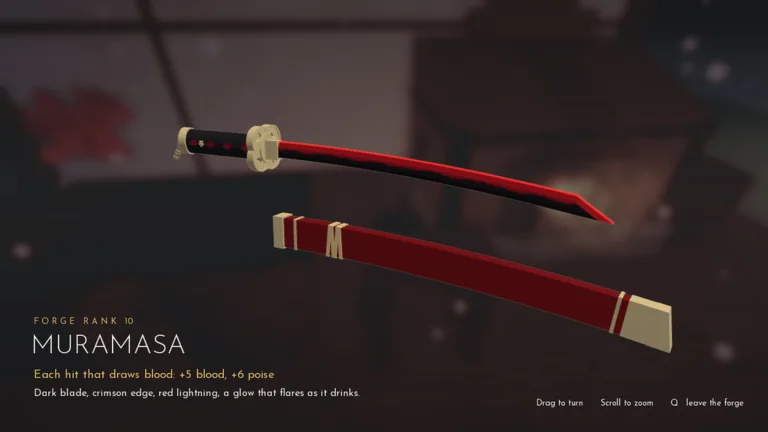
The Muramasa screenshot shows Forge Rank 10. Each hit that draws blood gives +5 blood and +6 poise. The on-screen description reads: dark blade, crimson edge, red lightning and a glow that flares as it drinks.
The screenshots do not say which level unlocks each blade, so ArcadeWiki does not list unlock levels. Compare the in-game Forge listing with these values after updates.
Family names
Open the character menu to roll for a family name. The official description says you adopt the names of famous historical samurai, and rarer names give better stat uplifts. The odds, the list of names and the size of each bonus are not published, so ArcadeWiki cannot say which names are best or how many rolls are worth spending.
Some code rewards in our list include rename spins. They probably relate to this roll, but the game's description does not say how they work, so read the in-game message after each redemption.
Codes, currency names and version notes
Our codes guide lists the reported codes and the Ryo rewards recorded for them. Third-party code lists disagree about some details: one calls the currency Gold, another Cash, and the lists differ on which codes are expired. Redeem a code and read the confirmation instead of relying on a single list.
This guide was written for version 1.4.1, which the Roblox page showed on November 23, 2026. Updates can change the Forge, controls and rewards.
Sources and what we have not tested
Game facts come from the official Roblox experience page, its description and its official screenshots. Controls and combos come from a published third-party guide and are labeled as reported. ArcadeWiki has not played or tested the Forge, arenas, family-name rolls or combos described here.